
An autonomous enterprise is one that uses its knowledge, applies agentic reasoning, and delivers faster, higher‑quality outcomes for customers. It operates through a modern stack that unifies a knowledge layer, an intelligent agent layer, and an outcomes layer, enabling systems to reason and act with context rather than rely solely on manual workflows.
The agentic layer combines large language model (LLM) reasoning capabilities with trusted data, policies, context, and analytics, enabling agents to perform actions such as querying structured and unstructured data, executing advanced analytics, running predictions, retrieving documents, and grounding responses in enterprise reality. This connection transforms AI from experimentation into operational impact.
Teradata Enterprise MCP acts as a core pillar of this autonomy by providing secure access to data, tool standardization, context management, auditability, and high scalability for agent actions. It ensures that agents can interact with enterprise systems in a trusted, governed, and consistent way while using analytics and knowledge capabilities at production scale.
The Model Context Protocol (MCP) in brief
MCP is an open-source standard designed to make AI systems talk to the outside world in a predictable, structured way. Instead of every developer inventing a new format for tools, capabilities, or metadata, MCP provides a common contract defining all these aspects, standardizing LLMs interactions with external tools. For a developer, this means spending more time designing the behavior of AI-powered agents, not worrying about how to package or describe needed tools or necessary parameters. The protocol takes care of that for you.
Teradata research teams and a group of community contributors built the community driven Teradata MCP, this open-source effort has taken off in ways none of us fully expected. Suddenly, people were building agents that could explore data, run analytics, and automate workflows directly inside the Teradata ecosystem. The best part is that the project keeps getting better as contributors continue to refine the server, add new tools, tighten the interface, and push the boundaries of what MCP-powered agents can do.
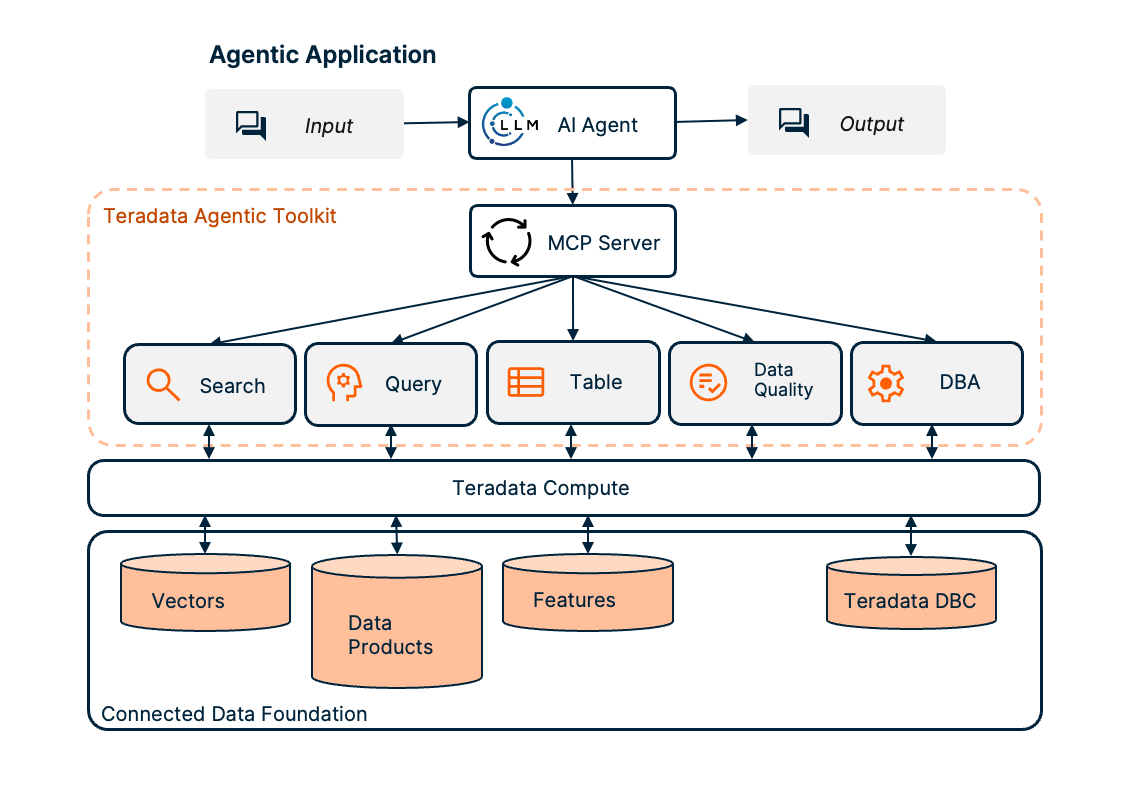
Teradata MCP server architecture
The challenges of deploying and implementing an MCP server
MCP isn’t without its challenges. While implementing an MCP server for an enterprise knowledge platform, the same questions always come up. Can it scale across teams? Can it connect to sensitive data with the right governance and privacy controls? What happens when teams start chaining servers together and bump into context‑overflow issues?
In consideration of these pain points, Teradata has developed Teradata Enterprise MCP. Teradata Enterprise MCP tackles the core operational and governance challenges head‑on. Enabling data professionals to focus on building agents that deliver value, easing the concerns around deployment, scaling, and access controls common to MCP as a protocol.
How Teradata Enterprise MCP contributes to your agentic AI projects
Teradata Enterprise MCP ships with a set of features that tackle common implementation challenges.
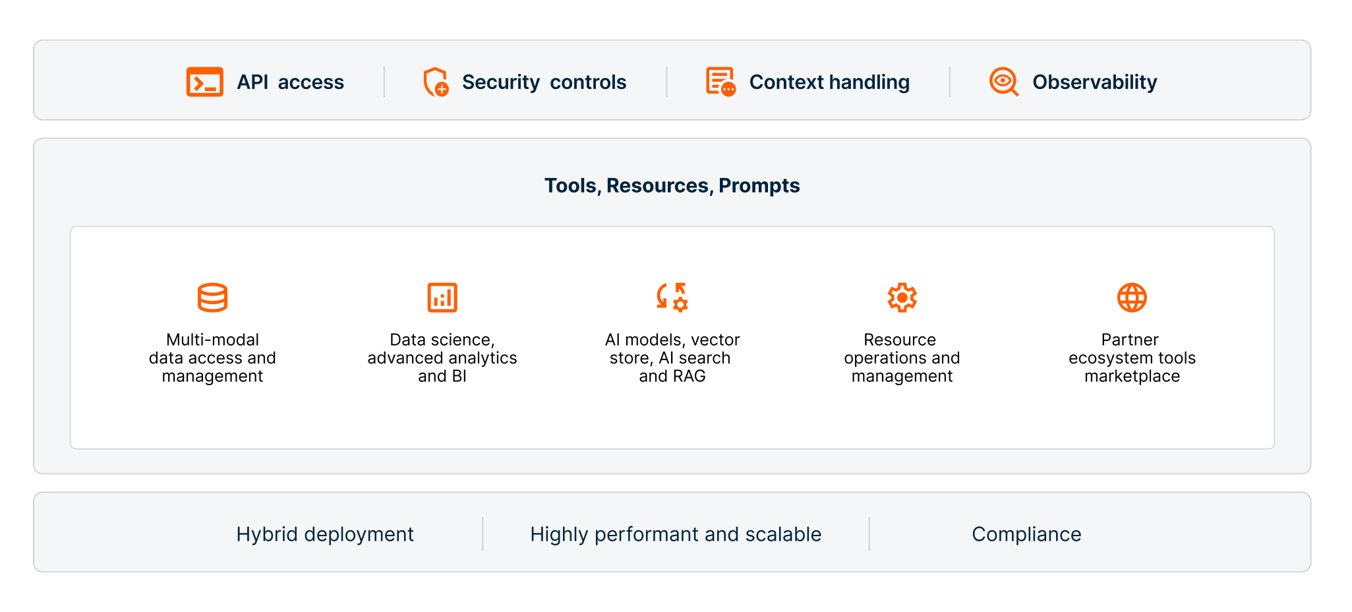
Features of Teradata Enterprise MCP
Security:
- Every user connects to Teradata Enterprise MCP using their own credentials, whether that’s basic TD2 authentication or JWT and Bearer tokens validated through the organization’s identity provider. This ensures the server only exposes the data that specific users are authorized to see, instead of routing all users through a single service account, unless the latter is the chosen implementation decision of the organization.
- RBAC controls tool visibility. MCP roles, with their corresponding assigned toolset, can be mapped to Teradata database roles so you can define exactly which tools a user can access in the system according to the user’s role.
- SQL injection protection, security scans, and end-to-end logging provide an enterprise grade security posture without adding friction for developers.
Performance:
- The server is built for multiuser, multi-session workloads with automatic connection pooling and sub second response times. Teams across the company can reliably share one MCP server without creating bottlenecks.
Tool context management:
- A deep catalog of more than a hundred production ready tools; from database queries and DBA functions to ML, vector search, and RAG might be difficult to manage for LLMs, however, because tool exposure is governed per role, each agent stays within a clean and compliant sandbox.
Experience Teradata Enterprise MCP
You can experience Teradata Enterprise MCP directly inside free trial. We’ve put together a sample notebook that shows a simple LangChain integration. This is only a starting point that you can extend according to your needs.
You can easily experiment on your own by following the steps below:
Setting up your development environment
- If you haven’t before, start by creating an account at www.teradata.com/experience.
- Once you’re logged in, create a new environment. This ensures you’re working with the latest features and capabilities. Take note of your chosen password as you will need it to create the MCP server configuration later.
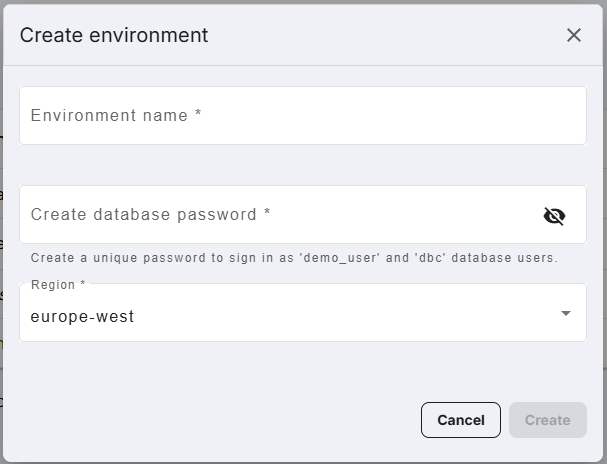
Create an environment - Start the Jupyter Notebook environment by clicking “Run demos".
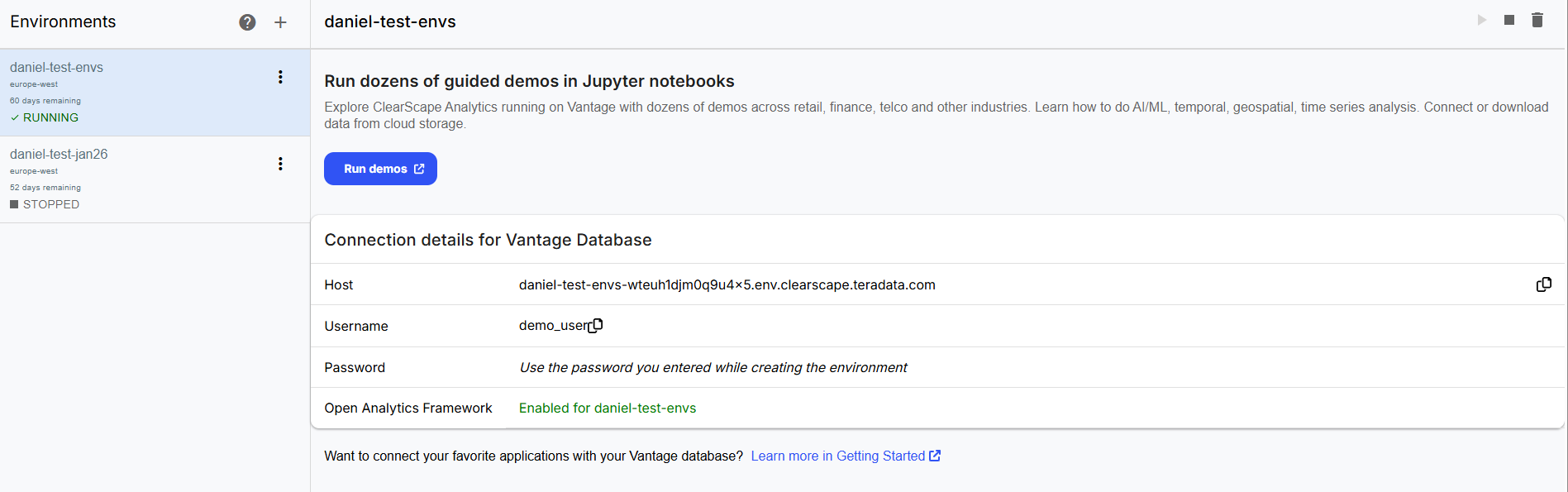
Run demos - In the Jupyter Notebook environment, open the “Getting Started” folder look for the folder named Enterprise_MCP_Data_Analyst_Agent, open the notebook inside that folder.
Exploring the notebook
- First, we install the packages needed for the MCP integration with LangChain.
pip install -U langchain langchain-mcp-adapters langchain-openai httpx - The notebook pulls in your environment settings from a .env file. This keeps your credentials secure and your code clean.
llm_key = os.getenv('litellm_key')

	llm_url = os.getenv('litellm_base_url')

	username = os.getenv('username')

password = os.getenv('my_variable') - Here we establish the connection to the Enterprise MCP Server using LangChain's MultiServerMCPClient. The MCP server uses the credentials retrieved from the environment variables to connect on your behalf and returns the available tools.
async def get_mcp_tools():

	client = MultiServerMCPClient(

	{

	"teradata": {

	"transport": "http",

	"url": "http://host.docker.internal:8001/mcp",

	"auth": httpx.BasicAuth(username, password),

	}

	}

	)

	tools = await client.get_tools()

	return client, tools


	client, tools = await get_mcp_tools()

print([t.name for t in tools]) - We initialize a chat model through the LLM proxy, then create a LangChain agent by passing in the Teradata MCP server tools. The system prompt tells the agent it's a data analyst working with Teradata.
llm = init_chat_model(

	model="openai-gpt-41",

	model_provider="openai",

	base_url="https://llmlite.ci.clearscape.teradata.com",

	api_key=llm_key, )


	agent = create_agent(

	model=llm,

	tools=tools,

	system_prompt=(

	''' You are a data analyst that responds to user questions regarding data in a teradata system '''

), ) - With everything set up, you can send natural language queries to the agent. It interprets your question, picks the right MCP tools, and executes them against your Teradata environment.
user_query = input('\n What would you like to know about your data? ')

	result = await agent.ainvoke(

	{"messages": [HumanMessage(content=user_query)]}

	)
Query submitted to the agent - The answer of the agent to this specific question is as follows:
print(result["messages"][-1].content)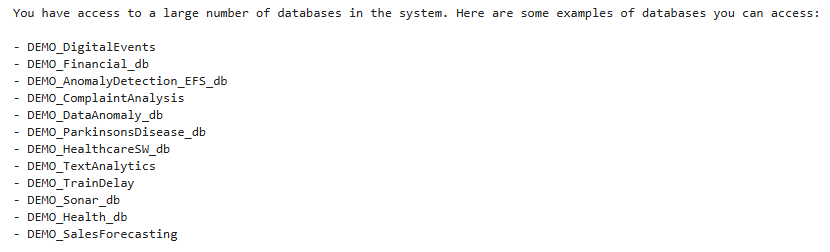
Agent response to the user query
Our trial is a free experience with access to limited resources. For a full demo on a production-grade Teradata environment, see Teradata Enterprise AgentStack.
Conclusion
The shift toward autonomous enterprises is no longer theoretical. With agentic AI, unified knowledge layers, and governed execution environments, organizations now have the foundations they need to build systems that reason, act, and deliver value with less manual intervention. The Teradata Enterprise MCP Server plays a significant role in making this real. It removes the operational and security hurdles that traditionally slow down MCP adoption and replaces them with a platform that feels stable, scalable, and ready for enterprise use. By giving teams a secure, governed, and high‑performance way to connect LLMs and agents to trusted data, the Enterprise MCP Server frees developers and data practitioners to do what they do best: build. Whether you are exploring early prototypes, scaling agentic workloads, or preparing for production‑grade deployments, the Enterprise MCP Server provides the backbone that lets you move faster, stay compliant, and unlock the full potential of agentic AI inside your organization.