
Build an image question-and-answering agent powered by Teradata Enterprise Vector Store and Unstructured.
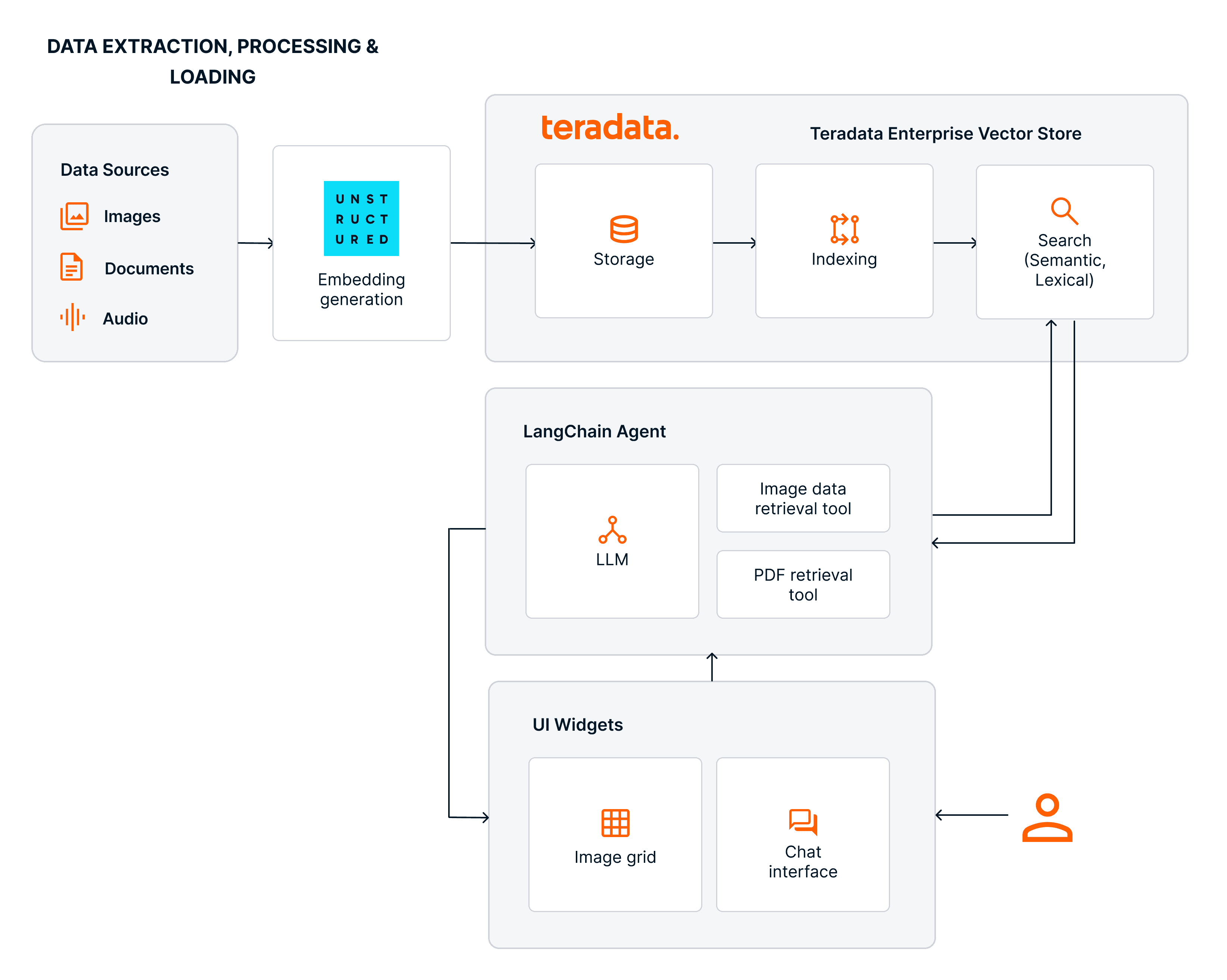
Multimodal RAG and Agents with Teradata & Unstructured
The challenge of grounding the work of agentic systems
Agentic systems work across multiple steps to achieve a specific goal. Precision and predictability in achieving that goal require rich context that often goes beyond structured transactional data. Policies, procedures, diagnostics, design documents, and customer conversations are often stored as documents, PDFs, images, and audio files. When that content is transformed into embeddings, making it searchable, agents gain something closer to long-term memory: they can retrieve relevant context, cite sources, and ground their responses in what is true for the organization, making them accurate and traceable.
Most enterprise data stacks split these two worlds cleanly. Transactional facts live in relational tables. Policies, manuals, and media live somewhere else, in object storage or file systems. Bringing them together requires additional data-processing pipelines and adds governance overhead.
It is possible, though, to bridge the gap between these two worlds, and it can be done on the same platform, without data duplication, data movement overhead, and extra governance layers.
Multimodal agentic development with Teradata and Unstructured
Teradata Enterprise Vector Store has unleashed a myriad of use cases for Teradata customers, including:
- Customer 360 enrichment and contact center intelligence
- Autonomous customer insights
- Compliance and policy intelligence
- Insurance claims and contract analysis
- R&D and engineering knowledge retrieval
- Large‑scale enterprise search
- Defense and public‑sector operational intelligence
These use cases are enabled by performing vector and metadata-aware search across structured and unstructured data in a single operation, directly within the Teradata system as the single source of truth.
Teradata’s partnership with Unstructured extends these capabilities by introducing a unified multimodal ingestion and enrichment layer capable of parsing 70+ file types and generating embeddings for text and images, with audio support on the roadmap. The Unstructured pipelines handle chunking, metadata extraction, enrichment, adaptive model selection, and embedding generation, and deliver these enriched artifacts directly into Teradata’s enterprise analytics platform. The Teradata platform provides a native security model, object‑level governance, and lineage propagation. Because the Enterprise Vector Store is implemented on top of Teradata’s MPP execution framework, vector indexing, similarity search, and hybrid semantic–lexical retrieval scale transparently with other analytic and operational workloads, inheriting Teradata’s concurrency, data locality, and high‑throughput characteristics.
For development, the langchain-teradata library offers a familiar interface for incorporating Teradata Enterprise Vector Store into your agentic workflows, providing the standard agentic primitives: chat models, tools, and retrievers. The result is a single system where agents can search, and act, without the extra pipelines or governance overhead that come with stitching separate tools together.
Experience multimodal agentic development with Teradata and Unstructured
In the walkthrough that follows, we will build a life sciences image question-and-answering agent powered by Teradata Enterprise Vector Store, using data ingested and embedded by Unstructured.
The final product is an agentic system where a user can pick an image from a gallery of medical image samples and ask questions about it. The agent relies on a library of medical image documentation, finds the documentation most like the selected image, and uses it to answer the user's question.
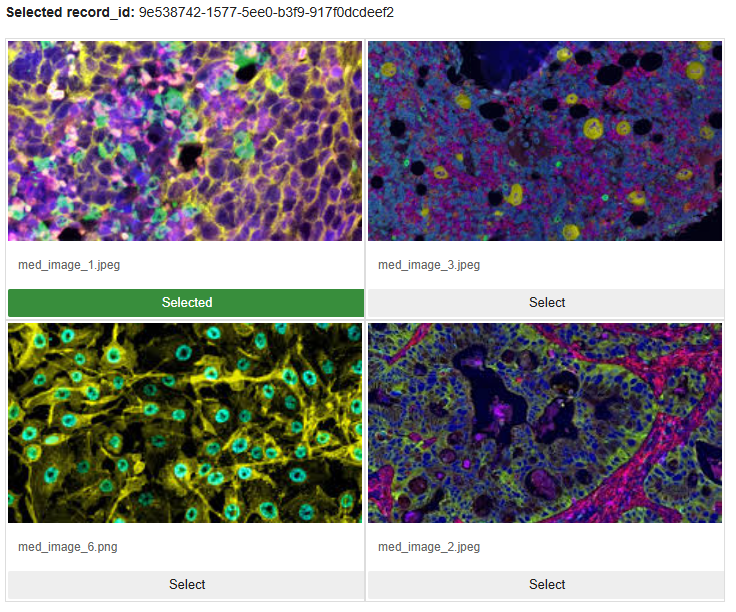
Image 1 – Image grid gallery
- Build an ingestion and processing pipeline for composite PDF documents and images using Unstructured, which also generates the embeddings.
- Store the embeddings in Teradata’s enterprise analytics platform and index them with Teradata Enterprise Vector Store.
- Match a user‑selected image to its most similar documents using vector similarity search.
- Wrap the workflow in a LangChain agent that allows users to query the results in natural language.
Setting up your development environment
- If you haven’t already, start by creating an account at teradata.com/experience.
- Once you’re logged in, create a new environment. This ensures you’re working with the latest features and capabilities.
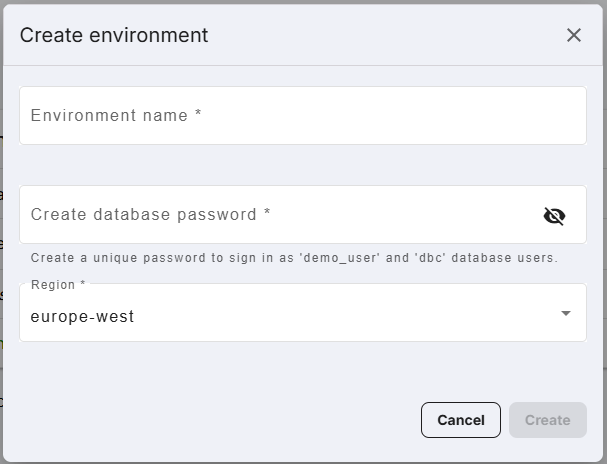
Image 2 – Create an environment - Start the Jupyter Notebook environment by clicking “Run demos.”
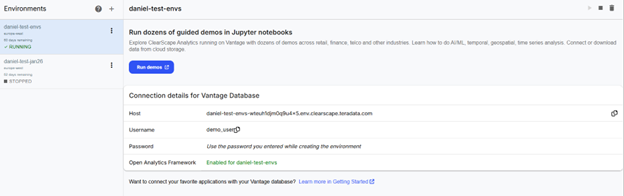
Image 3 – Run demos
Exploring the notebook
Setting up needed libraries and access to Teradata Enterprise Vector Store
- First, we install the packages needed.
%%capture

!pip install -r "./utils/requirements.txt" --quiet - After restarting the kernel, we import the libraries that will power our agentic multimodal system.
# Required imports


	# General imports

	from teradatagenai import VSManager

	from langchain_teradata import TeradataVectorStore

	from teradataml import *

	import os

	import json

	import re

	import time


	# Credentials and configuration management

	from dotenv import load_dotenv

	from getpass import getpass


	#Langchain Imports

	from langchain.chat_models import init_chat_model

	from langchain.agents import create_agent

	from langchain_core.messages import HumanMessage

	from langchain.tools import tool


	# Suppress warnings

	import warnings

	warnings.filterwarnings('ignore')

	display.suppress_vantage_runtime_warnings = True


	# Widget display

	from IPython.display import display, HTML, IFrame

	import ipywidgets as widgets


	# Import utilities

	from unstructured_utils.teradata_ingest import ingest

from utils.image_grid import display_image_grid - Our trial experience provides access to a Teradata instance with Enterprise Vector Store capabilities.
ues_uri=env_vars.get("ues_uri")

	if ues_uri.endswith("/open-analytics"):

	ues_uri = ues_uri[:-15] # remove last 5 chars ("/open-analytics")


	if set_auth_token(base_url=ues_uri,

	pat_token=env_vars.get("access_token"),

	pem_file=env_vars.get("pem_file")

	):

	print("UES Authentication successful")

	else:

	print("UES Authentication failed. Check credentials.")

	sys.exit(1)


	VSManager.health()

	```
Ingestion and processing pipeline with Unstructured
- Unstructured offers a graphical user interface (GUI) to create workflows. The same building blocks used in the GUI are available from Unstructured API. Namely: sources, destinations, workflows, and jobs.
- Workflows orchestrate data processing between a source and a destination with steps such as partitioning, chunking, enriching, embedding, etc.
- Jobs are specific execution of a workflow.
- We have built a function that abstracts our defined workflow. The full implementation is contained in the /unstructured_utils folder and imported into the notebook.
The workflow has three sequential nodes:
- Partitioning: Uses Claude as a vision-language model (VLM) to extract structured content from raw documents. Using a VLM rather than a traditional text extractor means it can handle complex layouts, images, and tables by “looking” at the document rather than just parsing text.
- Chunking: Splits the partitioned content into pieces using a title-aware strategy. It targets 1,500 characters per chunk, caps at 2,048, and adds a 100-character overlap between consecutive chunks so context isn’t lost at boundaries. It also retains the original elements alongside the chunks, which is useful for traceability.
- Embedding: Converts each chunk into a vector using Voyage AI’s multimodal model. The multimodal part matters here because the upstream VLM partitioner may have preserved image-based content, and a multimodal embedder can represent that meaningfully rather than ignoring it.
- In the notebook, we call this function to execute the ingestion of both composite PDFs and images.
ingest(api_key=unstructured_api_key,

	   td_host=env_vars.get("host"),

	   td_user=dbuser,

	   td_password=dbpwd,

	   td_database=default_db,

	   td_table='composite_pdfdocs_embedded',

	   s3_uri="s3://dev-rel-demos/teradata-unstructured/healthcare-assets/composite-pdfs/",

	   s3_anonymous=True)


	ingest(api_key=unstructured_api_key,

	   td_host=env_vars.get("host"),

	   td_user=dbuser,

	   td_password=dbpwd,

	   td_database=default_db,

	   td_table='image_samples_embedded',

	   s3_uri="s3://dev-rel-demos/teradata-unstructured/healthcare-assets/images/",

	   s3_anonymous=True)
Teradata Enterprise Vector Store: The engine for processing unstructured data
- The first step to create our Vector Store is to ingest the data loaded by Unstructured into teradataml DataFrames. We can inspect a sample of the records.
- The preview displays the record_id, filename, and record_locator columns. The embedding vectors are omitted here for readability, but they are present in the underlying table and will be used for similarity search in later steps.
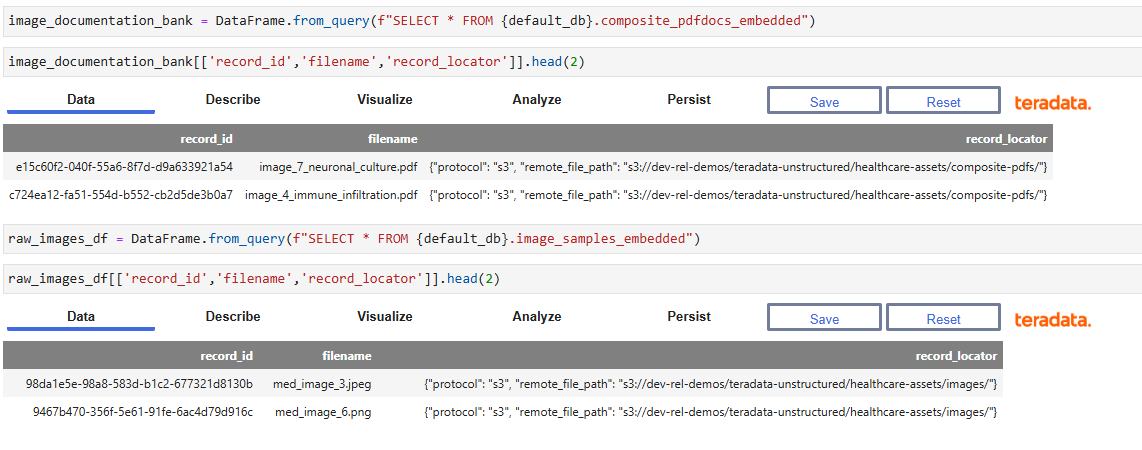
Image 4 – Ingested data in Teradata DataFrame - Once the documents are ingested and embedded, we create a Vector Store based on the embeddings through the `TeradataVectorStore` class `from_embeddings` method. This is a class inherited from `langchain-teradata`
vs_emb = TeradataVectorStore.from_embeddings(name = f"{default_db}_mm_embeddings_vs",

	data = image_documentation_bank,

	data_columns = "embeddings",

	key_columns = ["id", "record_id"],

	embedding_data_columns = "text",

metadata_columns = ["text","date_created", "date_modified", "record_locator", "filename"],) - The Vector Store registers and creates a new vector index in VantageCloud over the embedding column, enabling sub-second approximate nearest-neighbor lookups at scale. Key parameters include the data table, the column containing the embedding vectors `data_columns`, the primary key columns for deduplication, and the metadata columns to carry through into search results.
- The `TeradataVectorStore` class includes methods for performing searches, semantical or lexical, asking questions about the results of searches (powered by an included LLM client), and to update, re-index or destroy the Vector Store.
- We can use the Vector Store to perform similarity searches between any image on the image bank and the documentation library.
response = vs_emb.similarity_search_by_vector(data = raw_images_df.head(1), column='embeddings', top_k=1)
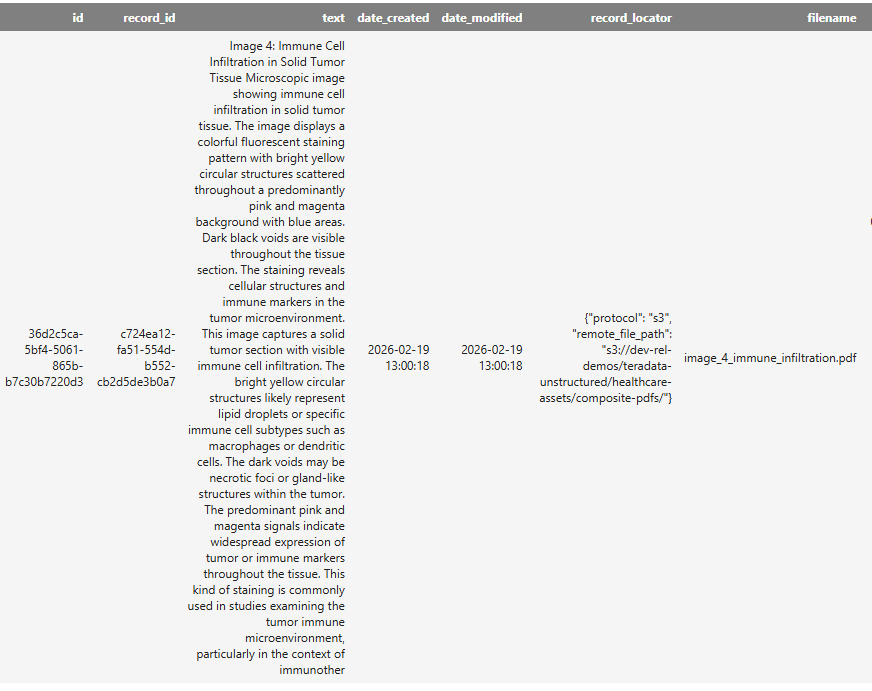
Image 5 – Similarity search results
The match is driven by the image contained in the composite document. The retrieval returns the associated text along with metadata included when creating the Vector Store index, such as the `record_locator` and `filename`. In an agentic system, this metadata allows an agent to fetch the original document if needed, while the text provides information to answer questions about the selected image.
Teradata Enterprise Vector Store includes a built-in LLM integration that enables natural language queries over vector search results.
question='I need to recover The title, description and record id, and locator of the most similar record?'

prompt='Format the response in a conversational way.'

response = vs_emb.prepare_response(question=question, similarity_results=response, prompt=prompt)
The response object contains the requested data in the requested format as processed by the chat model included in the Teradata Enterprise Vector Store.
Based on the provided data, here is the information you requested:
Title: Image 4: Immune Cell Infiltration in Solid Tumor Tissue
Description: Microscopic image showing immune cell infiltration in solid tumor tissue. The image displays a colorful fluorescent staining pattern with bright yellow circular structures scattered throughout a predominantly pink and magenta background with blue areas. Dark black voids are visible throughout the tissue section. The staining reveals cellular structures and immune markers in the tumor microenvironment.
This image captures a solid tumor section with visible immune cell infiltration. The bright yellow circular structures likely represent lipid droplets or specific immune cell subtypes such as macrophages or dendritic cells. The dark voids may be necrotic foci or gland-like structures within the tumor. The predominant pink and magenta signals indicate widespread expression of tumor or immune markers throughout the tissue. This kind of staining is commonly used in studies examining the tumor immune microenvironment, particularly in the context of immunotherapy response.
Record ID: c724ea12-fa51-554d-b552-cb2d5de3b0a7
Record Locator: {“protocol”: “s3”, “remote_file_path”: “s3://dev-rel-demos/teradata-unstructured/healthcare-assets/composite-pdfs/”}
The capabilities we have explored unlock a lot of possibilities for an agentic system, such as the one we are building.
Building a LangChain agent powered by Teradata Enterprise Vector Store
Our agent is wrapped in a widget UI that allows users to select an image from the gallery, and a chat widget that enables conversations. These widgets are merely UI abstractions; the components of the agent itself are the same as any LangChain agent. We need a `chat_llm` component, and a set of tools.
Our trial experience includes a proxy LLM client to power the `chat_llm`, while Teradata Enterprise Vector Store includes all the functionality needed to power the core tool.
llm_key = env_vars.get("litellm_key")

llm_url = env_vars.get("litellm_base_url")


llm = init_chat_model(

model="openai-gpt-41",

model_provider="openai",

base_url=llm_url,

api_key=llm_key,

)
def search_similar_image_documentation(dummy: str = "") -> str:
"""
Runs a similarity search using the currently selected image and displays
the most similar result. Call this whenever the user asks about similar images.
"""
if result.selected_id is None:
return "No image is selected. Please select an image from the grid first."
response_similarity = vs_emb.similarity_search_by_vector(
data=raw_images_df[raw_images_df["record_id"] == result.selected_id],
column="embeddings",
top_k=1,
return_type="json",
)
question = "I need to recover the title, description, filename, record id, and file_locator of the most similar record?"
prompt = "Format the response as JSON object."
response_chat = vs_emb.prepare_response(
question=question,
similarity_results=response_similarity,
prompt=prompt,
)
with chat_output:
display(HTML(
f"<div style='font-family:sans-serif; padding:12px; background:#f9f9f9;"
f"border-radius:6px; margin:8px 0;'>{response_chat}</div>"
))
return response_chat
The agent itself includes specific instructions to interact with the tools and respond to the users’ intent.
You are an image analysis assistant.
Tools available:
- search_similar_image_documentation: Find images similar to a given input and retrieve associated documentation
- display_pdf_from_locator: Render a PDF document
Workflow:
1. When a user provides an image or asks for similar images, call search_similar_image_documentation
2. If the user asks to view/open a PDF from the results, extract `filename` and `remote_file_path` from the search response and pass them to display_pdf_from_locator
3. If the user asks to describe features from the image in questions like: - What are the XYZ features of this image -
a. First call search_similar_image_documentation
b. If the documentation contains relevant information, answer based on it
c. If not, inform the user that the image library documentation does not contain information to answer their question, then display the PDF using display_pdf_from_locator so they can review it directly
d. Never ask to upload the image as the user is referring to the selected image.
If a search returns no results or the PDF fields are missing, let the user know.
The widget UI and the agent enable the fully agentic experience.
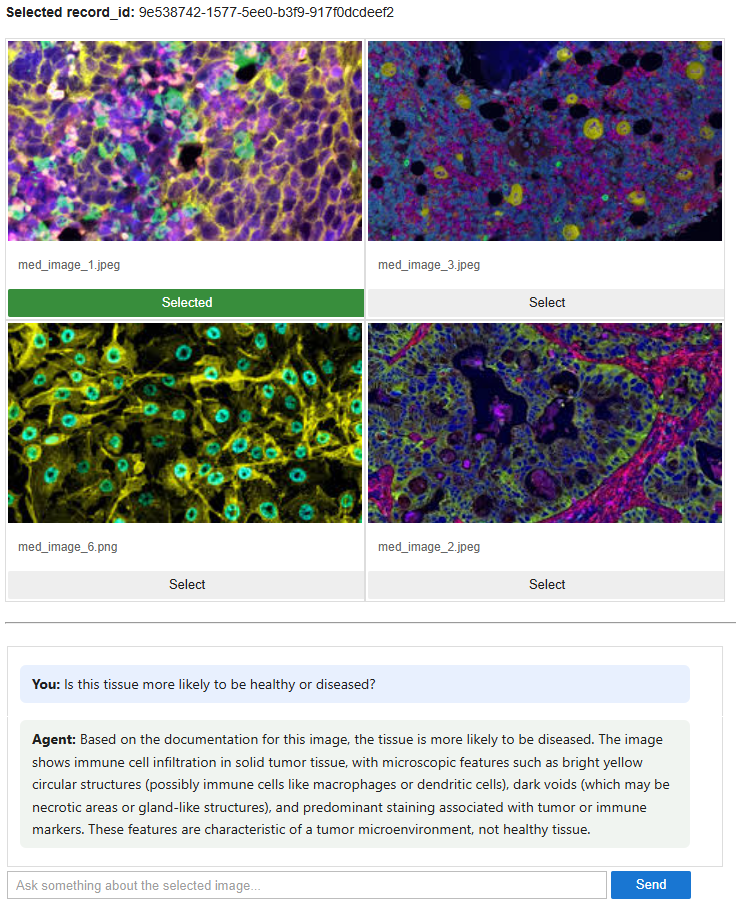
Image 6 – Agentic medical image question-and-answer experience
Learn more about Teradata multimodal agentic capabilities.
Build the demo yourself at teradata.com/experience.
Conclusion
Bringing together Teradata Enterprise Vector Store and Unstructured creates a unified foundation for multimodal agentic systems, one where structured and unstructured data coexist naturally, governance stays simple, and developers can build advanced retrieval-augmented workflows without extra pipelines or infrastructure overhead. High-fidelity ingestion, scalable vector indexing, and agentic tooling combine into a stack that reduces the friction between experimentation and production. The walkthrough here is one example of the pattern, but the same approach applies to customer experience, automation, and context-aware intelligence across industries. As multi-modal data and agentic AI continue to expand, this integrated stack gives organizations a practical path to accurate, grounded, and enterprise-ready agentic systems built for scale.